
إعلان سيرفرك في Revolution
طلب واحد من الديسكورد بيديك شانل إعلانات خاصة بيك، وصفحة لسيرفرك على الموقع، وإعلان لكل أعضاء ريفليوشن — ببلاش.
١هتاخد إيه؟
٢جهّز الحاجات دي الأول
كل الخانات إجبارية. المثال هنا سيرفر حقيقي عندنا: Rageon Online.
| الخانة | إيه المطلوب | المثال |
|---|---|---|
| اسم السيرفر | بحروف عادية — الزخرفة بتتشال لوحدها | Rageon Online |
| لينك الديسكورد | لينك دعوة سيرفرك | https://discord.gg/r7QBggg3ZX |
| لينك الموقع | موقع السيرفر — إجباري | https://play-rageon.net |
| البانر | بانر إعلانات عريض (شوف تحت) | 468 × 60 متحرك |
| الكاب | أعلى لفل | 110 |
| الدرجة | Degree | 11 |
| الريتس | Low · Medium · High · Custom | Medium |
| المناطق | CHN only · EUR only · CHN & EUR | CHN & EUR |
| سطر عن السيرفر | جملة قصيرة بتظهر تحت الاسم | Classic 110 cap, no P2W |
٣البانر
كل بنرات الموقع والشانلات بمقاس واحد: 728 × 90. ابعت أي بانر إعلانات
عريض — المقاسات المشهورة 728 × 90 و 468 × 60 وأي حاجة بينهم —
والسيستم بيظبطه على المقاس لوحده من غير ما يقصّ منه حاجة. والـGIF المتحرك بيفضل متحرك.

٤قدّم من الديسكورد
- ادخل روم 👑・ᴍᴀsᴛᴇʀ في سيرفر ريفليوشن:
افتح الروم
— ودوس ADS Request.
 Revolution APPADS Request Create Ticket Streamers Bot Request Discord Service
 - هيفتحلك الفورم الأول Links: الاسم واللينكين والبانر، ودوس
Submit.
Server Ads — 1/2 Links
×Rageon Onlinehttps://discord.gg/r7QBggg3ZXhttps://play-rageon.netA wide ad banner (PNG, JPG or GIF) — we fit it to 728 × 90468x60.gif3.0 MBCancelSubmit - هتطلعلك رسالة فيها زرار Add Info — دوس عليه.
Revolution APP✅ Links saved. One more step — press Add Info.➡️ Add Info
- الفورم التاني Info: الكاب والدرجة والريتس والمناطق وسطر عن
السيرفر، ودوس Submit.
Server Ads — 2/2 Info
×11011MediumCHN & EURClassic 110 cap, no P2WCancelSubmit - خلاص — طلبك وصل للإدارة. هتجيلك رسالة أول ما يتوافق عليه.
Revolution APP✅ Your request was sent. Once it's approved you'll get your ads channel here and your server page on the website.
٥بعد الموافقة
شانل الإعلانات بتاعتك
بتتعمل باسم سيرفرك بستايل السيرفر:
⭐・ʀᴀɢᴇᴏɴ-ᴏɴʟɪɴᴇ
إنت بس اللي تقدر تكتب فيها — نزّل فيها بوستات الدعاية بتاعة سيرفرك.
إعلان لكل الأعضاء
البوت بينزّل الإعلان ده في شانل الأنونسمنت بمنشن للكل:
 New Partner Server !!
 @everyone
 Please welcome Rageon Online to the Revolution family!
Classic 110 cap, no P2W

 Server Info
 Cap: 110
Degree: 11
Rates: Medium
Regions: CHN & EUR
 Owner: @Rageon
 Ads channel: #⭐・ʀᴀɢᴇᴏɴ-ᴏɴʟɪɴᴇ
 Join them, check their page and vote for them on our website!
Revolution Server Page
 Website
 Discord
صفحتك على الموقع
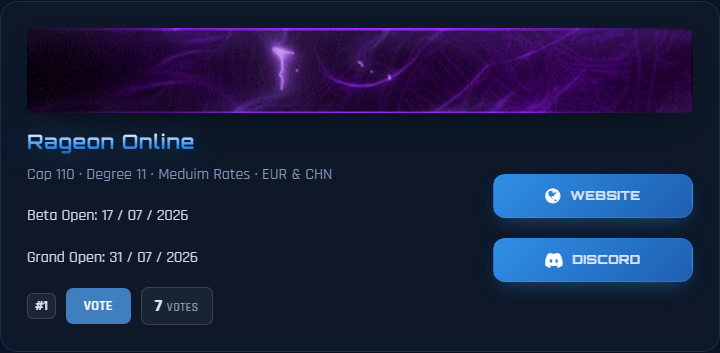
سيرفرك بيظهر في Sro Ads بالبانر والمعلومات واللينكات، والناس تصوّتله. ده كارت Rageon الحقيقي:
تعدّل صفحتك
ادخل الموقع بـ Continue with Discord — حسابك اتعمل خلاص ومربوط بالديسكورد بتاعك، ومن صفحة سيرفرك دوس Edit.
؟أسئلة بتتسأل كتير
البانر بتاعي اترفض، أعمل إيه؟
728 × 90 أو 468 × 60.
الصور المربعة واللوجوهات مش بتنفع. البوت بيقولك مقاس صورتك كام.اسم سيرفري مزخرف، هيبان إزاي؟
🔥 𝐑𝐚𝐠𝐞𝐨𝐧 🔥 بيبقى Rageon.قفلت الفورم قبل Add Info؟
عندي صفحة قبل كده بنفس الاسم؟
البارتنرشيب خلص — إيه اللي بيحصل؟
Advertise your server on Revolution
One request on Discord gets you your own ads channel, a page for your server on the website and an announcement to every Revolution member — free.
1What do you get?
2Prepare these first
Every field is required. The example is a real server of ours: Rageon Online.
| Field | What's needed | Example |
|---|---|---|
| Server name | Plain letters — fancy fonts are removed automatically | Rageon Online |
| Discord link | Your server's invite link | https://discord.gg/r7QBggg3ZX |
| Website link | Your server's website — required | https://play-rageon.net |
| The banner | A wide ad banner (see below) | 468 × 60 animated |
| Cap | Max level | 110 |
| Degree | Degree | 11 |
| Rates | Low · Medium · High · Custom | Medium |
| Regions | CHN only · EUR only · CHN & EUR | CHN & EUR |
| One line about the server | A short sentence shown under the name | Classic 110 cap, no P2W |
3The banner
Every banner on the site and in the channels uses one size: 728 × 90. Send any wide ad banner — the common sizes are 728 × 90 and 468 × 60 and anything in between — the system fits it to size by itself without cropping anything. Animated GIFs stay animated.
4Apply on Discord
- Go to the 👑・ᴍᴀsᴛᴇʀ room in the Revolution server: Open the room — and press ADS Request.
Revolution APPADS Request Create Ticket Streamers Bot Request Discord Service
- The first form opens: Links: name, both links and the banner — then press Submit.
Server Ads — 1/2 Links
×Rageon Onlinehttps://discord.gg/r7QBggg3ZXhttps://play-rageon.netA wide ad banner (PNG, JPG or GIF) — we fit it to 728 × 90468x60.gif3.0 MBCancelSubmit - You'll get a message with an Add Info button — press it.
Revolution APP✅ Links saved. One more step — press Add Info.➡️ Add Info
- The second form Info: cap, degree, rates, regions and one line about the server — then press Submit.
Server Ads — 2/2 Info
×11011MediumCHN & EURClassic 110 cap, no P2WCancelSubmit - Done — your request reached the staff. You'll get a message as soon as it's approved.
Revolution APP✅ Your request was sent. Once it's approved you'll get your ads channel here and your server page on the website.
5After approval
Your ads channel
It's created with your server's name in the server's style:
⭐・ʀᴀɢᴇᴏɴ-ᴏɴʟɪɴᴇ
Only you can write in it — post your server's ads there.
An announcement to every member
The bot posts this in the announcements channel with an @everyone mention:
New Partner Server !! @everyone
Please welcome Rageon Online to the Revolution family!
Classic 110 cap, no P2W
Server Info
Cap: 110
Degree: 11
Rates: Medium
Regions: CHN & EUR
Owner: @Rageon
Ads channel: #⭐・ʀᴀɢᴇᴏɴ-ᴏɴʟɪɴᴇ
Join them, check their page and vote for them on our website!
RevolutionServer Page
Website
Discord
Your page on the website
Your server shows on Sro Ads with the banner, info and links, and people vote for it. This is Rageon's real card:
Edit your page
Log in to the website with Continue with Discord — your account is already created and linked to your Discord. From your server page press Edit.
?Frequently asked questions
My banner was rejected — what do I do?
728 × 90 or 468 × 60. Square images and logos don't work. The bot tells you your image size.My server name uses a fancy font — how will it look?
🔥 𝐑𝐚𝐠𝐞𝐨𝐧 🔥 becomes Rageon.